BTC Staking Transaction Decoder
The BTC Staking Transaction Decoder is a powerful tool available on Core Scan that allows users to verify and validate their Bitcoin staking transactions. This tool helps diagnose potential formatting issues with your staking transactions after they’ve been submitted to the Core network
Overview
The decoder tool performs comprehensive validation of BTC staking transactions by:
- Transaction Confirmation Status: Verifies that the transaction has been confirmed on the Bitcoin network
- OP_RETURN Output Validation: Verifies the transaction contains the correct OP_RETURN output format required by the Core protocol
- Validator Address Verification: Confirms that the target validator address is valid and active on the Core network
- Protocol Compliance: Validates that the transaction meets all Core staking protocol requirements
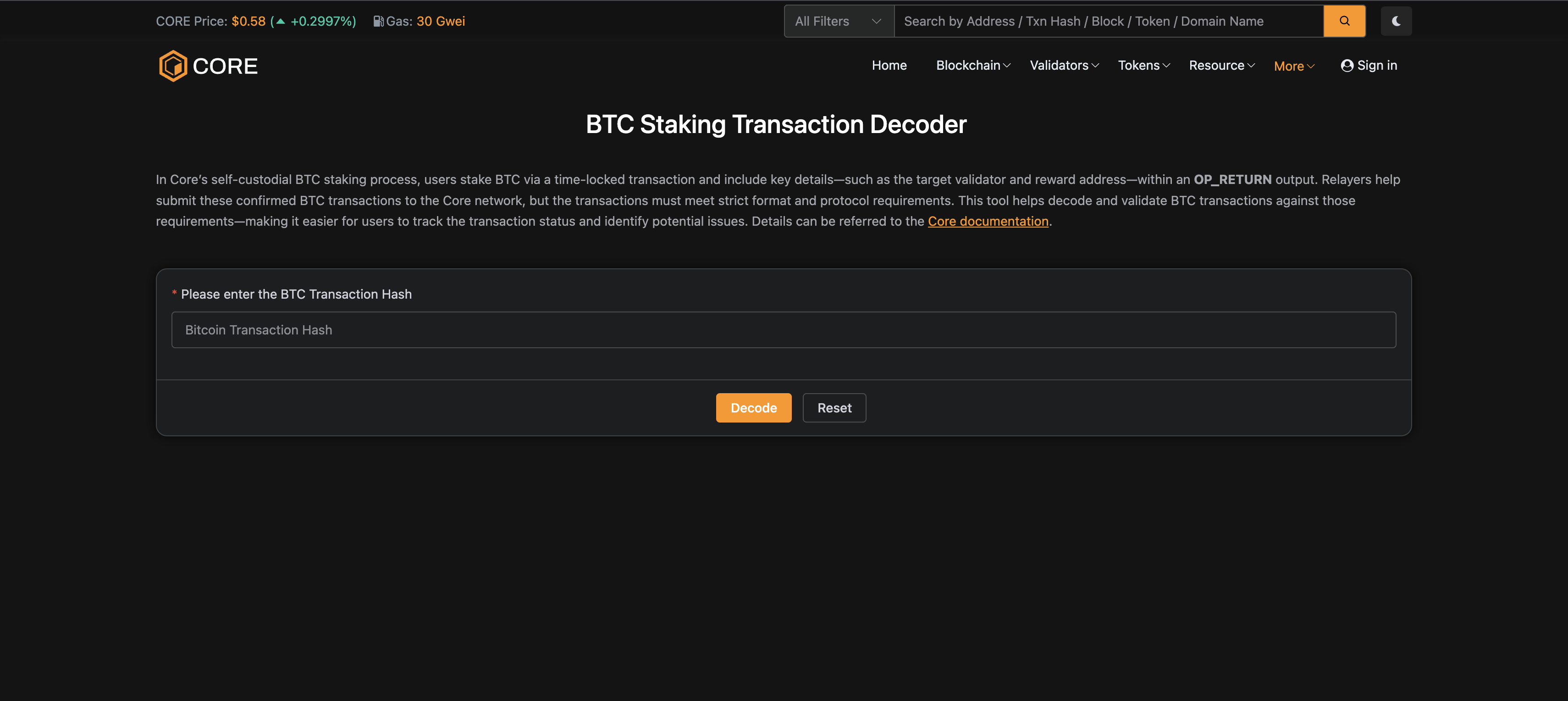
This validation process analyzes your BTC staking transaction and assists in identifying issues if the transaction did not succeed.
Tool Functionality
This tool helps decode and validate BTC Staking transactions against protocol requirements by parsing the transaction's OP_RETURN output, making it easier for users to track the transaction status and identify potential issues.
This tool tracks the following transaction statuses:
- Pending: The transaction has not yet been included in a block.
- Confirming: The transaction is included in a block but has fewer than 6-block confirmations.
- Staked: The staking is active.
- Failed: Staking attempt failed.
- Expired: The staking period has ended, but rewards have not yet been claimed.
- Redeemed: The staking period has ended and rewards have been successfully claimed.
- Missed: The transaction was confirmed after the staking period had already ended, resulting in no staking rewards.
How to Use the Transaction Decoder
Step 1: Access the Decoder Tool
Navigate to the BTC Staking Transaction Decoder on Core Scan.
Step 2: Enter Transaction Hash
- Locate the transaction hash field on the decoder page
- Copy your BTC staking transaction hash from your wallet or blockchain explorer
- Paste the transaction hash into the input field
- Click the
Decodebutton to begin the analysis
Step 3: Analyze Decoded Information
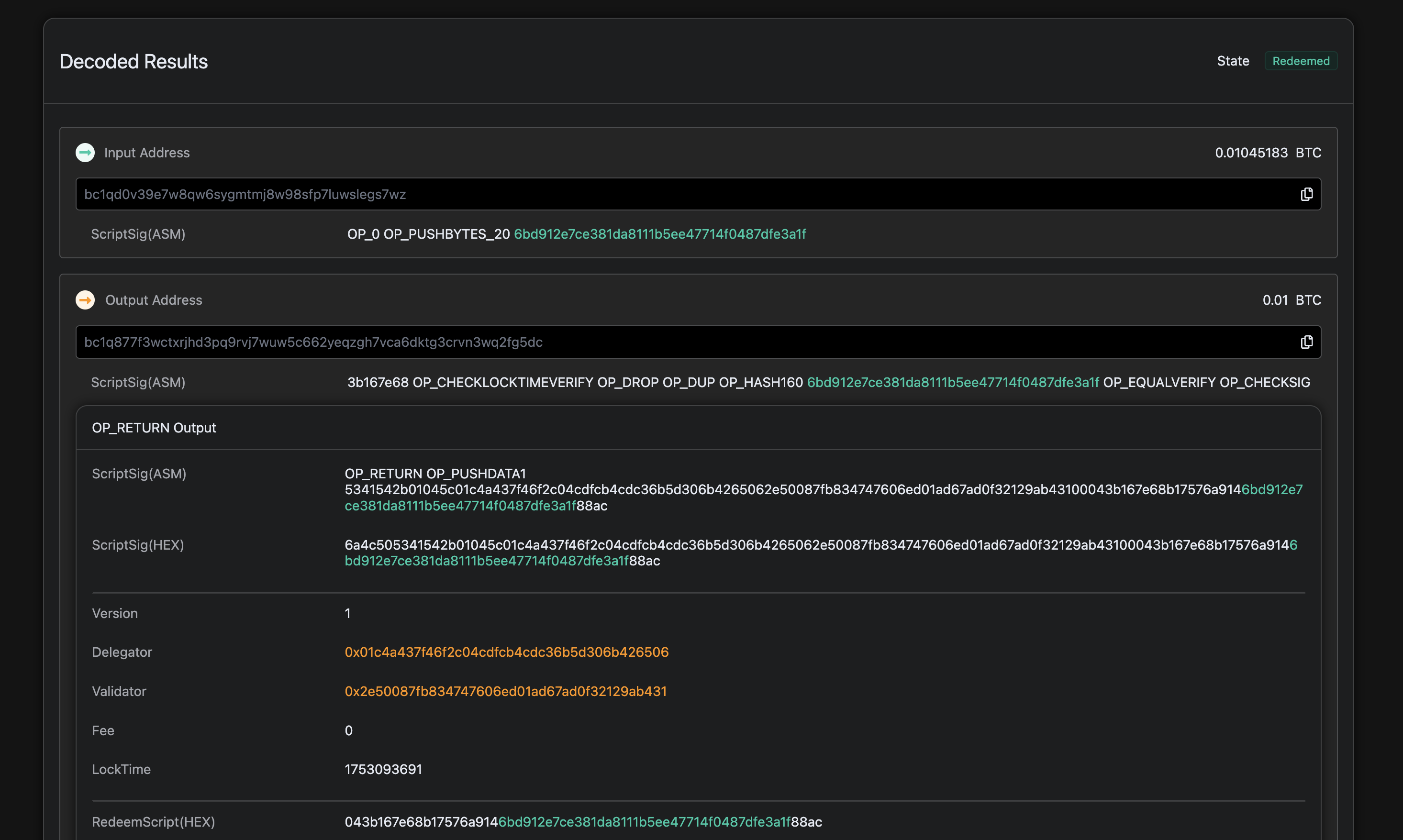
The decoder will provide detailed information about your transaction:
- Transaction State: Shows the current status of your staking transaction (Pending, Confirming, Staked, Failed, Expired, Redeemed, or Missed)
- Input/Output Addresses: Shows the flow of BTC in your staking transaction
- OP_RETURN Data: Contains the encoded staking information including delegator and validator addresses
- Delegator address: The CORE reward address of the staker on the Core chain.
- Validator address: The address of the validator to whom the staker delegated their BTC.
- LockTime: Unix timestamp representing the end date and time of your staking
- PublicKeyHash: Your public key hash for verification purposes
Common Issues and Solutions
Transaction Not Confirmed
- Issue: Transaction is still pending in the mempool
- Solution: Wait for Bitcoin network confirmation (typically 1-6 blocks)
Invalid OP_RETURN Format
- Issue: The OP_RETURN output doesn't match Core protocol requirements
- Solution: Make sure the OP_RETURN format is correct. For detailed guidance, refer to the format specified here
Invalid Validator Address
- Issue: The validator address is not active or doesn't exist
- Solution: Verify the validator address and ensure they're an active Core validator
Benefits of Using the Decoder
- Verifies Protocol Compliance: Verifies whether the transaction meets all requirements and decodes the staking transaction details.
- Provides Transparency: Clear visibility into your staking transaction details
The BTC Staking Transaction Decoder helps users verify the details of their self-custodial BTC staking transactions and helps you to resolve issues when a BTC staking transaction fails to register with the Core network.